.png)

How to Organize Receipts and Bookkeeping Before Tax Time

Tax time has a way of making small piles of paper feel much bigger than they are. A few fuel dockets in the glovebox, supplier invoices in an email folder, card statements somewhere in online banking, and a bulging envelope in the kitchen drawer can quickly turn into a stressful mess.
The good news is that messy records can be brought under control. You do not need a perfect setup to start. You need a simple order of attack, a few consistent categories, and a way to match your paperwork to what happened in your bank account.
This guide walks through a practical method for sorting your receipts, invoices, bank statements, credit card purchases, and loan records before tax time. It is written with Australian small businesses and sole traders in mind, but the same approach works for most record-keeping clean-ups.
This article is general information only. For advice on your tax position, speak with a registered tax agent, accountant, or bookkeeper.

Start with one clear goal
The aim is not to create a beautiful filing system in one afternoon. The first goal is much simpler:
Match each business transaction to a clear record.
That means being able to answer three basic questions:
What was bought or sold?
When did it happen?
How was it paid or received?
If those answers are easy to find, the rest of your bookkeeping becomes much easier. Your accountant or bookkeeper can work faster. You are less likely to miss claimable business costs. You also reduce the risk of scrambling if you are asked to provide records later.
For Australian businesses, record keeping matters because you may need to support the figures in your BAS, tax return, GST claims, depreciation schedules, and other reporting. Business records generally need to be kept for several years, so the system should be simple enough to maintain, not just good enough to survive this tax season.
Gather everything before you start sorting
Before you enter anything into software or a spreadsheet, collect the raw material. This is the part many people skip, which is why they end up processing the same month three times.
Bring everything into one place:
Paper purchase dockets
Tax invoices
Supplier statements
Sales invoices
Bank statements
Credit card statements
Loan statements for business assets
Finance contracts or chattel mortgage paperwork
Petty cash notes
Parking, toll, fuel, postage, and stationery records
Emails with attached invoices
Screenshots or PDFs from online supplier portals
Do not worry yet about whether each item is deductible or where it should be coded. At this stage, you are only trying to stop records from hiding in different places.
If your records are partly digital, create a temporary folder on your computer or cloud drive called something simple, such as `Tax records to sort`. Save PDFs there before you begin. If your records are mostly paper, use a tray, box, or large envelope.
A shoebox is not the problem. A shoebox with no order is the problem.
Sort documents by type first
Once everything is in one place, tip out the envelope, empty the drawer, or open the folder and start separating the documents into broad piles.
The first sort should be by document type:
Purchase invoices and expense dockets
Sales invoices and income records
Bank statements
Credit card statements
Loan or finance statements
Other supporting documents
This first step gives you a quick feel for what you have and what is missing. It also stops you from treating every piece of paper the same way. A Bunnings tax invoice, a bank statement, and a loan repayment schedule all matter, but they serve different purposes.
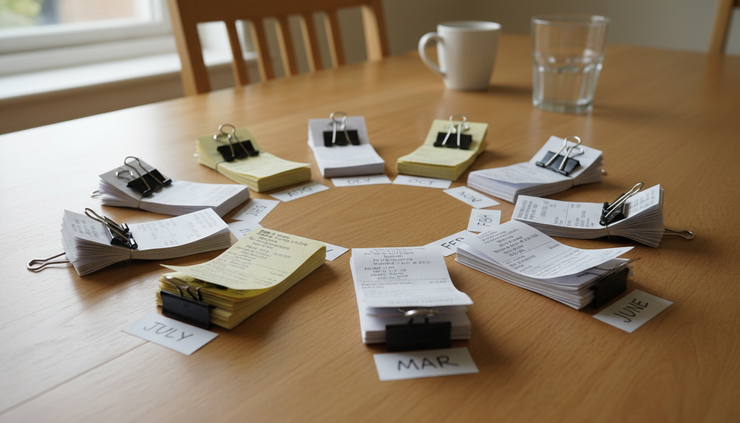
Once you have the document types separated, sort each pile by month. Use the financial year as your guide, from 1 July to 30 June.
If you do not have folders, use sticky notes or sheets of paper labelled by month. The system does not need to be fancy. It only needs to stop July from mixing with February.
Check how much your software has already done
The next step depends on how automated your bookkeeping system is.
If you use accounting software connected to your business bank account, many transactions may already be imported. Some software can also store copies of invoices, bills, and expense documents against the related transaction. If you use a receipt capture app, some purchases may already have the document attached.
That does not mean you can skip the check. Automation helps, but it does not always know the full story.
Go through each month and confirm that the paperwork matches the transactions in your system. When a document is already attached to the right transaction, mark the paper copy. A small tick, stamp, or note such as “entered” is enough.
This prevents a common bookkeeping problem: entering the same expense twice because the paper copy and the bank feed both looked like separate items.
If your software is current, your job may be mainly filing and checking. That is a much easier job than rebuilding a full year from scratch.
Use a spreadsheet if you are not automated yet
If you do not use bookkeeping software, or your records are too messy to trust, a spreadsheet can be a simple bridge. It will not replace proper bookkeeping forever, but it can turn a pile of documents into something your accountant or bookkeeper can work with.
Create one workbook for the financial year. Then create a separate sheet for each month.
Use columns that capture what your tax agent or bookkeeper will need:
Column | What to record | Example |
Date | The transaction date | 14 August |
Supplier | Who you paid | Local printer |
Description | What was purchased | Business cards |
Total amount | The full amount paid | $132.00 |
GST | The GST component, if shown | $12.00 |
Payment method | Bank, card, cash, or loan | Business debit card |
Expense account | The likely category | Printing and stationery |
Notes | Anything unusual | Includes delivery |
Do not get stuck trying to make every category perfect. Use plain categories that make sense, such as:
Motor vehicle expenses
Telephone and internet
Office supplies
Software subscriptions
Advertising
Rent
Insurance
Repairs and maintenance
Professional fees
Travel
Meals where genuinely business-related
Your accountant or bookkeeper can adjust the coding later. What matters now is that the date, supplier, amount, GST, and purpose are clear.
When entering GST, use the tax invoice as your guide. Some transactions include GST, some do not, and some may be partly business and partly private. If you are unsure, flag it in the notes column rather than guessing.
Match the paperwork to bank and card statements
Once the documents are sorted and entered, pull out the bank statements for the whole financial year. Do the same for any credit card used for business purchases.
This is where your records start to become useful.
Work month by month. Compare your spreadsheet or software transactions against the bank and card statements. Tick off each item as you match it.
You are looking for three things:
Business expenses on the statement that have no matching invoice or docket
Paper invoices that do not appear to have been paid
Private expenses that should not be claimed as business costs
This step can reveal forgotten items. For example, an annual software subscription may appear on a card statement, but the invoice may only be available by logging into the supplier’s portal. A toll account may charge automatically each month. A parking app may email tax invoices that were never downloaded.
If you find missing documents, make a “to chase” list. Keep it short and specific:
Missing item | Where to look |
Fuel invoice from 9 October | Glovebox or fuel app |
Software subscription from March | Supplier account portal |
Insurance payment in July | Email inbox or insurer login |
Equipment finance statement | Lender website |
A short list is far better than a vague feeling that “some things are missing”.

Do not forget loans and financed assets
Loan and finance records often get missed because they do not look like normal expenses. They may relate to vehicles, equipment, tools, fit-outs, or other business assets.
Gather the loan documents and statements for anything linked to the business. This may include:
Vehicle loans
Equipment finance
Hire purchase agreements
Chattel mortgages
Business overdrafts
Business credit cards
Personal loans used partly for business purposes
Loan repayments often include more than one accounting treatment. Part of the repayment may reduce the loan balance, and part may be interest. The asset itself may also need to be recorded and depreciated, depending on the situation.
This is an area where a bookkeeper or accountant is especially useful. You can still help by gathering the right documents. The more complete the paperwork, the easier it is to treat the loan correctly.
Create a filing system you will actually use
Once the year is sorted, set up a filing system that is easy to keep going.
A complicated system will fail the first time you are busy. A simple system might be enough.
For paper records, use one folder for the financial year and dividers for each month. File documents after they have been entered or checked. If you like marking documents, use a tick or “entered” stamp before filing.
For digital records, create folders like this:
```text
2024-2025 Financial Year
July
August
September
October
November
December
January
February
March
April
May
June
```
Use file names that tell you what the document is without opening it. For example:
```text
2024-08-14-local-printer-132.pdf
2025-03-02-software-subscription-88.pdf
2025-05-19-fuel-station-76.pdf
```
A good file name includes the date, supplier, and amount. That makes searching much easier later.
If you use accounting software, attach the digital copy to the transaction whenever you can. Then keep the original paper or digital file in your folder as backup.
Build a monthly habit after tax time
Cleaning up a whole year is possible, but it is rarely pleasant. The better plan is to turn the tax-time rescue mission into a monthly routine.
Set aside a short block of time once a month. At the end of each month, do four things:
Save all invoices and dockets for the month.
Match them to bank and card transactions.
Enter or check the GST and expense category.
File the documents in the right month.
That small habit prevents the shoebox from coming back.
If monthly still feels too much, try quarterly. Tie the routine to BAS preparation if your business is registered for GST. The key is to avoid waiting until the accountant asks for everything at once.
The best bookkeeping system is the one you can keep using when business is busy.
Know when to hand it over
There is no prize for doing every part yourself. If your records are sorted by month and matched to bank statements, you have already done valuable work. A bookkeeper can usually take it from there faster than you can, especially if transactions need coding, GST treatment needs checking, or loans and assets are involved.
Handing over good records also saves money in many cases because you are not paying someone to search through mixed paperwork for basic information.
Before you pass records on, include:
Bank statements for the full financial year
Credit card statements used for business
Sorted invoices and expense records
Loan and finance statements
Access to bookkeeping software, if used
Notes on anything unusual
A list of missing documents still being chased
This gives your accountant or bookkeeper a clean starting point.

What organised records look like
By the end of the process, you should be able to open a folder, spreadsheet, or software file and find the record for a transaction without digging through random papers.
A clean tax-time package usually has:
Documents sorted by month
Expenses matched to bank or card payments
GST shown where relevant
Loan and finance statements included
Missing items listed clearly
Digital or paper copies filed for future reference
That is enough to turn panic into progress.
Start with the pile in front of you. Sort it by type, then by month. Check what your software already knows. Enter what is missing. Match everything to statements. File it in a way you can repeat next month.
Tax time becomes much less stressful when your records tell the story before anyone has to ask.


Comments